As Thomas Friedman famously pointed out, the world is flat (or at least, flattish). But with no universal language to unite us, English has become the de facto international language; the modern day Esperanto. Web based translating tools have become more accurate and agile in recent years, allowing multilingual conversations in forums and across enterprises. But there remains a problem in this ever diversifying world. Namely, how can we integrate complex systems that were defined with different native languages? In a world or international corporate mergers, how can we make our data play nice?
Data quality is the key to the success of any company. The cleaner and more accurate your data is, the better your business decisions will be. Some corporations continue to delay the Master Data Modeling (MDM) process due to a lack of leadership, or simply a lack of time and resources to achieve these goals. But these delays will almost certainly lead to larger costs the longer they wait. As insurmountable as the idea of mastering ones sprawling data may appear, delaying your efforts will be far more costly and time consuming. After all, there will only be more data to wrangle. The reality is that data is a corporation's greatest resource and any ability to stay ahead of the pack requires the ability to identify or predict trends, to focus efforts and to avoid work redundancies. All of this requires a deep understanding of our data. Of course, this is all dependent on the quality of that data and this issue is even further compounded by a language barrier.
Luckily, regardless of which MDM method your corporation eventually implements, there are basic strategies that can facilitate the process. One of the most fundamental strategies is to establish strongly defined Data Standards. For the purposes of this article, I am simply talking about creating a glossary of terms that become the universal vocabulary for an enterprise. In so doing, we facilitate communication across the entire enterprise, whether we are designing an application or generating a report or weekly sales, the transparency of the data comes from its name. This same method allows international collaboration.
In the following case we discuss an actual example in which an English team and a Spanish team needed to integrate their systems. The example has been simplified but the process would be valid for any larger project.
The first step was to have the US and Spanish team compile a glossary of business terms within their individual teams. Luckily, both teams had already created a glossary and were enforcing naming standards using a data modeling tool.
The next step was to translate and align the defined glossary values between both corporate standards. This was done mostly by using available translation tools and a bilingual employee.
Alignment was pretty straightforward but there remained a number of unaligned terms. All remaining unmapped terms were discussed in a meeting between the two teams. From this discussion, it was found that some of the remaining terms actually did map to each other. The remaining terms existed only in one system. These were added to the current shared glossary. The remaining entries needed to be discussed in greater detail. In the end these needed to be added to the glossary or removed from discussion and different terminology applied from the existing list of terms. This turned out to be the most time consuming part of the process.
Next,the existing glossary file which had English names mapped to physical abbreviations was updated and using the resulting translations from the steps above, another glossary was generated. A section of the resulting files follows:
Each glossary value was replaced with its foreign counterpart in the Spanish version of the file:
Since the teams were using a data modeling tool and naming standards, the logical design was currently synchronized with the physical table design. For example, the following Employee table...
...transformed by the glossary, defined the physical table...
This physical model was used to derive a new logical model using the translated Spanish language glossary. The results look like...
Even more useful was that the original Spanish language model could be linked to our physical gold standard model and our compare showed an apples to apples object alignment.
The two models appear as...
But when we add our Gold Standard physical model as the source for the Spanish model we see that the objects align based on our defined abbreviations
Using the sample described above, we notice that there is no Unique Employee ID on the current Employee table in the Spanish model. The decision is made that this should be implemented to have unique identifiers across the enterprise. We export the column to the Spanish model and the result is the following
Notice that the exported column appears as Empleado_Identificador and that the translation was automated by the attached naming standard file.
So what are the benefits of all this? By clearly defining a clear common language we can allow our designers to work in their own languages while updating a shared model. This allows more transparency and easier reporting. This also saves time as the translation is automated rather than having to occur multiple times during the process. Alternately, English could have been imposed on everyone’s design but this can lead to issues when developers are writing applications and may misunderstand the contents of a column due to the language barrier. Also, users requiring reporting services would need to have these reports translated multiple times. The initial investment is a huge time saver in the long term.
The takeaway is that a strong glossary of agreed upon terminology and concepts can make information sharing across a multilingual enterprise far easier and more transparent. A strongly defined data model greatly facilitates this.
Monday, July 12, 2010
Friday, June 18, 2010
Ensuring Data Quality and Governance Using Model Templates
In an ideal world the contents and purpose of any database table could be intuited solely on its name. Wouldn’t it help the development process to understand the content of a column based purely on its label? Wouldn’t data analysis be easily accomplished if system reports always implemented naming standards for all business objects on different systems? Wouldn't it facilitate data warehousing if similar data was always stored with similar datatypes regardless of the system in question? The answer, in every case, is yes. But this is easier said than done.
Whether you are a data architect designing a set of system tables, the database administrator who maintains that system, the development team who writes applications against an existing system, or even the business analyst that relies on report data to analyze current and future trends; the standardization of your design across your enterprise lends a level of transparency that facilitates work flow.
Data makes the world go round and the success of our business decisions, in large part, depends on the quality of our data. This has brought Master Data Management (MDM) to the forefront of every business discussion. As data stores continue to grow, the question becomes how to best ensure the transparency and quality of this data to all levels of the organization. The cornerstone of any MDM initiative should be a well defined data model.
A powerful data modeling tool can greatly facilitate this process by allowing you to define, maintain and share a set of corporate standards. Once these standards are defined, their reusability and convenient maintenance can save time and money.
The CA ERwin Data Modeler has an especially robust number of reusable features that can easily be shared as standalone template files as well as to the shared Model Manager repository. With that in mind, I am launching a series of articles relating to the reusability of design to ensure design integrity and data quality.
If you would like to try some of the exercises in this series, CA offers a limited Community edition of Erwin (available here) as well as a full version of the tool with a 15 day limited trial (available here).
In this first post I will be looking at the ability to define a reusable Domain object to define a column that changes depending on its context. Note that you can click on any image for a larger view.
First, we need to create a new model. We can define any physical database as our target server in this particular example. We create a new Domain in the Logical model and call it ID. Define the Domain Parent as Number. In the Datatype tab, define select INTEGER from the list.
In the general tab, notice that the default Name Inherited by Attribute is %AttDomain. This simply means that the domain name will be the domain name in a new occurrence of the attribute.
We modify this to read %OwnerEntity_%AttDomain:
This will prefix the domain name with the Owner entity. Note that this is not the Entity Name but rather the entity in which the column first occurs. This allows the name to remain constant as it migrates to other entities. So let us see the results.
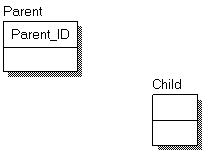
Click OK to exit the editor. Now create two entities called Parent and Child.
Drag the ID domain into the parent column from the Model Explorer and release it. The result is:
Draw an identifying relationship from Parent to Child and note the migrating column name:
Now drag the ID domain into the Child table:
In this way, we can create domains that automatically follow a corporate standard to facilitate naming conventions. The Domain can further be customized to contain Defaults and Constraints and also to create UDPs and even to define default Data Warehouse rules on each column.
We will be covering the use of UDPs and implementation of Data Warehousing concepts in future entries in this series so stay tuned.
Whether you are a data architect designing a set of system tables, the database administrator who maintains that system, the development team who writes applications against an existing system, or even the business analyst that relies on report data to analyze current and future trends; the standardization of your design across your enterprise lends a level of transparency that facilitates work flow.
Data makes the world go round and the success of our business decisions, in large part, depends on the quality of our data. This has brought Master Data Management (MDM) to the forefront of every business discussion. As data stores continue to grow, the question becomes how to best ensure the transparency and quality of this data to all levels of the organization. The cornerstone of any MDM initiative should be a well defined data model.
A powerful data modeling tool can greatly facilitate this process by allowing you to define, maintain and share a set of corporate standards. Once these standards are defined, their reusability and convenient maintenance can save time and money.
The CA ERwin Data Modeler has an especially robust number of reusable features that can easily be shared as standalone template files as well as to the shared Model Manager repository. With that in mind, I am launching a series of articles relating to the reusability of design to ensure design integrity and data quality.
If you would like to try some of the exercises in this series, CA offers a limited Community edition of Erwin (available here) as well as a full version of the tool with a 15 day limited trial (available here).
In this first post I will be looking at the ability to define a reusable Domain object to define a column that changes depending on its context. Note that you can click on any image for a larger view.
First, we need to create a new model. We can define any physical database as our target server in this particular example. We create a new Domain in the Logical model and call it ID. Define the Domain Parent as Number. In the Datatype tab, define select INTEGER from the list.
In the general tab, notice that the default Name Inherited by Attribute is %AttDomain. This simply means that the domain name will be the domain name in a new occurrence of the attribute.
We modify this to read %OwnerEntity_%AttDomain:
This will prefix the domain name with the Owner entity. Note that this is not the Entity Name but rather the entity in which the column first occurs. This allows the name to remain constant as it migrates to other entities. So let us see the results.
Click OK to exit the editor. Now create two entities called Parent and Child.
Drag the ID domain into the parent column from the Model Explorer and release it. The result is:
Draw an identifying relationship from Parent to Child and note the migrating column name:
Now drag the ID domain into the Child table:
In this way, we can create domains that automatically follow a corporate standard to facilitate naming conventions. The Domain can further be customized to contain Defaults and Constraints and also to create UDPs and even to define default Data Warehouse rules on each column.
We will be covering the use of UDPs and implementation of Data Warehousing concepts in future entries in this series so stay tuned.
Tuesday, June 1, 2010
Filtering COLLATE Syntax using the CA ERwin FET
Welcome to the inaugural Maximum Data Modeling blog post. I look forward to using this blog to provide some best practices regarding the use of the CA ERwin Modeling Suite to maximum effect and hope to learn some new tricks, from the community, along the way. Without further delay, let’s get onto our topic.
Often, after reverse engineering a SQL Server 2005 or 2008 database environment, users find that the tool has collected the COLLATE property on many of the columns. Case in point, I have Reverse engineered the default ‘master’ database on a SQL Server 2005 server (NOTE: Click any image for better detail):
If I preview the SQL generated for the table spt_fallback_dev it looks like:
CREATE TABLE spt_fallback_dev
(
xserver_name varchar(30) COLLATE SQL_Latin1_General_CP1_CI_AS NOT NULL , xdttm_ins datetime NOT NULL ,
xdttm_last_ins_upd datetime NOT NULL ,
xfallback_low int NULL ,
xfallback_drive char(2) COLLATE SQL_Latin1_General_CP1_CI_AS NULL ,
low int NOT NULL ,
high int NOT NULL ,
status smallint NOT NULL ,
name varchar(30) COLLATE SQL_Latin1_General_CP1_CI_AS NOT NULL ,
phyname varchar(127) COLLATE SQL_Latin1_General_CP1_CI_AS NOT NULL
)
go
The COLLATE syntax is valid and does exist on these objects. However, usually the COLLATE is defined as a server default and it is unnecessary and even improper to include it in the table definition since it may conflict with the environment to which we will be generating the script.
We will now create a simple solution for this using a Model Level UDP and a handful of added lines of code in the FET editor.
First, we define the UDP at the model level. It will be a List type UDP with values of No and Yes.
Next we will delve into the Forward Engineer Template editor. If you are not familiar with this editor, there is a demo video in the Videos folder of the Erwin Install path. This video is also available On Demand on the Erwin.com site.
In the FET editor select your sample Context to be the same table, spt_fallback_dev. Select the Create Entity from the list of templates. Notice that the Expanded Text includes the Collate statements.
Next, we are going to define a Global Flag depending on whether the UDP is set to yes or no. We do this by entering the following text into the Template Source editor right between ShouldGenerate and the beginning of the first code comment.
PushOwner
@if (Equal(Property("Model.Physical.COL COLLATION"),"Yes")){SetGlobalFlag("CollateFlag")}
Pop
Now our FET code looks like…
So what does that all mean?
First of all, we want to get to the model level but we are in the Entity so we PushOwner. The FET works like any stack and we push each time we want to climb a level. If you have ever used the ErwinSpy (and it is a must if you plan to do anything with the FET or the API) you can see exactly how many layers in the stack one object is from another.
Next, we have an if condition checking for equality between the UDP and the string “Yes”. If they match we set the global flag variable “CollateFlag” (the name is arbitrary).
The trickier part of the syntax is the UDP name. In general all model properties are simply referenced like Property(“”). But in the case of the UDPs the syntax is (1).(2).(3). So we end up with Model.Physical.COL COLLATION
We finish off this clause with a Pop statement to move back from our push position down to the Entity level.
That is the worst bit of it. We have just one step to go. Use the Find in the Template editor to locate the key word COLLATE. If you use a case sensitive match you will find this:
This is the code that is generating the COLLATE syntax. We need to make it conditional. We are going to do this by placing the entire thing within the if condition…
@if(IsGlobalFlagSet("CollateFlag")){ … }
Now our editor looks like:
Make sure to enclose the entire collate syntax within the {}. The IsGlobalFlagSet is a default macro that does exactly what you expect, it returns TRUE if the specific value is defined.
Notice that the table definition has already lost its COLLATION syntax (provided you left the UDP set to No).
Save the template file to your local drive. You cannot override the Default but you can save this as your standard FE template file once you have saved it to your drive.
Now, in your Forward Engineer editor use the Browse button to specify this new FET file:
Preview your good work:
Subscribe to:
Posts (Atom)